Building a Barcode and QR Code Scanner for Qt 6.10.1 on Android
Our team was building a Qt application that required barcode and QR code detection on Android - supporting various formats including QR codes, EAN, Code 128, and others. As Qt developers, we naturally looked for Qt-based solutions first, hoping to maintain cross-platform code. What we found was a landscape of libraries working to keep up with Qt 6 multimedia changes.
We evaluated two popular Qt barcode scanning libraries:
QZxing
QZxing is a Qt/QML wrapper for the ZXing library. While researching, we found that it does have Qt 6 support (added in version 3.1.0), which was encouraging. However, several factors gave us pause:
- The last release (3.3.0) was in September 2022, over two years ago at the time of our evaluation
- We found reports of crashes on Android 12 with Qt 6.2.3
- The library relies on QTextCodec which has been moved to the core5compat module in Qt 6
- Various GitHub issues showed ongoing challenges with Qt 6 implementation
Given we were targeting Qt 6.10.1 (released much later), we were concerned about compatibility and decided not to invest time testing it. We acknowledge this might have been overly cautious - the library might work perfectly fine - but we needed confidence in our foundation.
SCodes
SCodes by Somco Software appeared more promising initially. It's a Qt & QML wrapper for ZXing-C++ specifically designed with Qt 6 support in mind. The developers built and tested it with Qt 5.15.2 and Qt 6.3.0.
We tried SCodes first. On our desktop Linux development machines, it worked beautifully - the camera feed displayed and barcodes were detected reliably. However, when we deployed to Android, while the camera feed displayed correctly, barcode and QR code detection failed completely. The scanner would run, show the camera view, but not recognize any codes we pointed it at.
Looking into this, we weren't alone. The Qt 6 multimedia API underwent major architectural changes - specifically the removal of QAbstractVideoFilter and QVideoFilterRunnable classes that Qt 5 libraries relied on. While SCodes addressed this with separate implementations for Qt 5 and Qt 6, we found reports of Android issues with Qt 6 builds.
We want to emphasize: SCodes is well-designed and the developers clearly put thought into Qt 6 support. The desktop implementation proved this. Our issue was specifically with barcode/QR code detection on Android in our Qt 6.10.1 environment.
Our Decision: Going Native with JNI
At this point, we had to make a pragmatic decision. We could:
- Debug and potentially fix the Qt 6 Android camera issues in these libraries
- Use an older Qt version where these libraries worked reliably
- Implement a native Android solution using JNI
Given our timeline and the maturity of Android's native barcode scanning ecosystem, we chose option 3. Yes, it meant abandoning Qt's cross-platform for this feature, but we needed something that would reliably work in production.
Our Solution: ZXing Android Embedded via JNI
We bridged Qt C++ with Android's native scanning capabilities using Java Native Interface (JNI), integrating with ZXing Android Embedded by JourneyApps.
Why We Chose ZXing Android Embedded
After researching Android barcode libraries, ZXing Android Embedded stood out:
- Actively maintained: Version 4.3.0 (the latest as of our implementation) with regular updates
- Battle-tested: Wraps Google's ZXing library used by countless Android apps
- Complete solution: Provides ready-made scanning UI, handles camera permissions, supports all major barcode formats
- Proper licensing: Apache 2.0 license
- Good documentation: Clear integration examples
Our Architecture
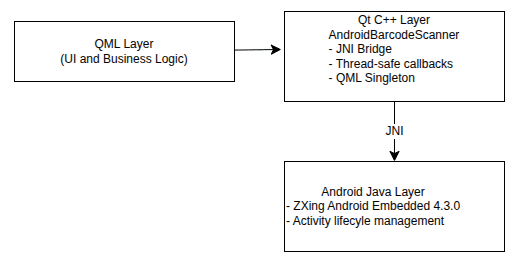
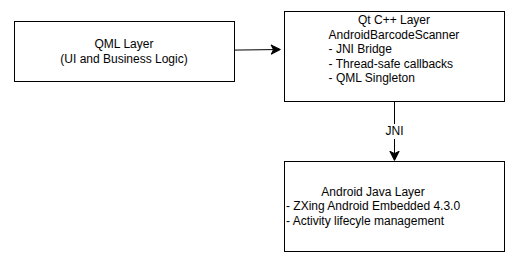
We implemented a three-layer architecture:
Implementation Overview
Our implementation consists of three main components working together through JNI. Here's how they fit together:
Layer 1: Java/Android Side
MainActivity.java - Extends QtActivity and manages the scanner lifecycle:
- Maintains a static instance reference for JNI callbacks
- Creates and holds the BarcodeScanner instance
- Handles activity results from the ZXing scanner
- Provides static methods callable from C++ via JNI (
createScanner,startScan)
BarcodeScanner.java - Wraps ZXing Android Embedded:
- Stores the native C++ pointer passed from Qt
- Configures scan options (formats, prompts, camera settings)
- Launches the ZXing
CaptureActivityvia Android intents - Processes scan results and calls native C++ methods with the stored pointer
- Declares native methods:
onScanResult,onScanCancelled,onScanError
Gradle dependencies:
implementation 'com.journeyapps:zxing-android-embedded:4.3.0'
implementation 'com.google.zxing:core:3.5.3'
Layer 2: C++/Qt Side
AndroidBarcodeScanner - A QML singleton that bridges to Java:
- Constructor: Registers JNI native methods and passes
thispointer to Java - Public API:
startScan()method callable from QML, state properties (isScanning,state) - JNI callbacks: Static methods that receive results from Java with the native pointer
- Thread safety: Uses
QMetaObject::invokeMethodwithQt::QueuedConnectionto marshal callbacks from Android threads to Qt's main thread - Signals: Emits
scanResult(code, format),scanCancelled(),scanError(error)to QML
Key implementation detail - passing the C++ instance to Java:
// In constructor: pass our C++ object pointer as jlong
QJniObject::callStaticMethod<void>(
    "MainActivity", "createScanner", "(J)V",
    reinterpret_cast<jlong>(this));
The JNI method registration:
JNINativeMethod methods[] = {
    { "onScanResult", "(JLjava/lang/String;Ljava/lang/String;)V",
      reinterpret_cast<void *>(onScanResultNative) },
    { "onScanCancelled", "(J)V",
      reinterpret_cast<void *>(onScanCancelledNative) },
    { "onScanError", "(JLjava/lang/String;)V",
      reinterpret_cast<void *>(onScanErrorNative) }
};
env.registerNativeMethods(barcodeScannerClass, methods, 3);
Each callback receives the pointer, converts JNI strings to Qt strings, and safely invokes Qt code on the main thread.
Layer 3: QML/UI Side
The QML integration is straightforward thanks to the singleton pattern:
Button {
    text: "Scan Barcode"
    enabled: !AndroidBarcodeScanner.isScanning
    onClicked: AndroidBarcodeScanner.startScan()
}

Connections {
    target: AndroidBarcodeScanner

    function onScanResult(code, format) {
        console.log("Detected", format, "code:", code)
        // Process the scanned barcode
    }

    function onScanCancelled() {
        // User cancelled the scan
    }

    function onScanError(error) {
        // Handle error
    }
}
The isScanning property automatically updates through Qt's property system, and all signals are emitted on the Qt main thread, making them safe to use directly in QML.
Data Flow
- QML → User taps scan button →
AndroidBarcodeScanner.startScan() - C++ → Calls Java static method →
MainActivity.startScan() - Java → Configures and launches ZXing
CaptureActivity(native Android scanner UI) - User → Points camera at barcode, ZXing detects and decodes it
- Java → Receives result in
onActivityResult→ Calls nativeonScanResult(nativePtr, code, format) - C++ → JNI callback → Retrieves pointer → Queues lambda on Qt thread → Emits
scanResultsignal - QML →
onScanResulthandler executes with decoded data
Full source code available: We've published the complete implementation including all Java, C++, and QML files as a reference project here.
Key Technical Challenges
Thread Safety is Critical
The most important lesson: JNI callbacks execute on Android's thread, not Qt's main thread. We learned this the hard way when our app crashed intermittently during testing. The solution is using QMetaObject::invokeMethod with Qt::QueuedConnection to safely queue operations on Qt's main thread before emitting signals or updating state.
Memory Management
JNI strings require explicit memory management - you must acquire them with GetStringUTFChars and release with ReleaseStringUTFChars. Forgetting the release causes memory leaks. We caught this during memory profiling and added proper cleanup throughout.
Pointer Passing
We needed Java to maintain a reference to our C++ object for callbacks. The standard approach works well: pass the C++ pointer as a jlong (64-bit integer) through Java, then cast it back on the native side. This is reliable on modern 64-bit Android devices.
Results and Trade-offs
What We Gained
- Reliability: Works flawlessly on all our test devices (Android 8-14), detecting QR codes, EAN, Code 128, and other formats accurately
- Performance: Native detection is fast and responsive
- Professional UX: Android users get the scanning experience they expect
- Maintainability: ZXing Android Embedded is actively maintained
- Production confidence: Battle-tested library used by thousands of apps
- Format support: All major 1D and 2D barcode formats work out of the box
What We Gave Up
- Cross-platform code: This solution is Android-only
- Qt purity: We're mixing Qt, C++, Java, and JNI
- Simplicity: JNI adds complexity compared to pure Qt
- Desktop testing: Must use Android devices/emulators for testing
Is This Right For You?
Consider this approach if:
- You need reliable Android barcode/QR code detection now
- You're using Qt 6.x where existing Qt libraries have detection issues
- You're comfortable with JNI and platform-specific code
- Production reliability matters more than code purity
- You need support for multiple barcode formats (1D and 2D)
Look elsewhere if:
- You absolutely need cross-platform code
- The pure Qt libraries work in your environment
- You can wait for library updates
Known Limitations
We're aware of several issues and trade-offs with this approach:
- Limited UI customization: Unlike SCodes where we could build custom camera overlays with QML, ZXing Android Embedded uses its own scanning UI. While professional and functional, we can't customize the overlay to match our app's design language as easily
- Activity lifecycle: The static
instancepointer could cause problems if Android recreates the activity (rotation, memory pressure) - Deprecated API: We're using
startActivityForResultinstead of modernActivityResultContracts - Missing cleanup: No notification to Java when C++ object is destroyed
- Unused state: The
Processingenum state isn't utilized
These haven't caused problems in our production deployment, but they're areas for future improvement or trade-offs we've accepted for reliability.
Retrospective
While we started hoping for a pure Qt solution, pragmatism led us to JNI. Qt 6's multimedia changes created a transition period where native integration became the more reliable path forward.
We want to emphasize our respect for the developers of QZxing and SCodes. Building and maintaining cross-platform Qt libraries is challenging work, especially with major API changes between Qt versions. Both libraries represent significant engineering efforts and work well in their supported environments.
For our specific needs - Qt 6.10.1 with reliable Android barcode and QR code detection across multiple formats in production - the JNI approach delivered. Qt's excellent JNI support made platform-specific integration viable, and that flexibility proved valuable.
If you're facing similar challenges, we hope our experience helps inform your decision. The code is yours to use and adapt.
Resources and References
Source Code:
- Complete Qt Barcode Scanner Implementation - Full working example with Java, C++, and QML
- SCodes - Qt 6 barcode scanner (works on desktop)
- QZxing - Qt/QML wrapper for ZXing
Libraries:
- ZXing Android Embedded - The native Android library we integrated with
Technical Documentation:
- Qt Multimedia in Qt 6 - Understanding the API changes
- Qt JNI Documentation - Official Qt JNI guide
- How To Scan Barcodes in Qt QML Application - SomcoSoftware's approach
Keep Reading
Related Articles
Comments
Sign in to join the discussion.
Loading comments…